kitDesign is not only for Shiny apps. Reports, user manuals and
workshop handouts made with Quarto (.qmd) can look like the
apps too: the same colors, rounded typeface and black borders, with
results written as status boxes, callouts and diagrams.
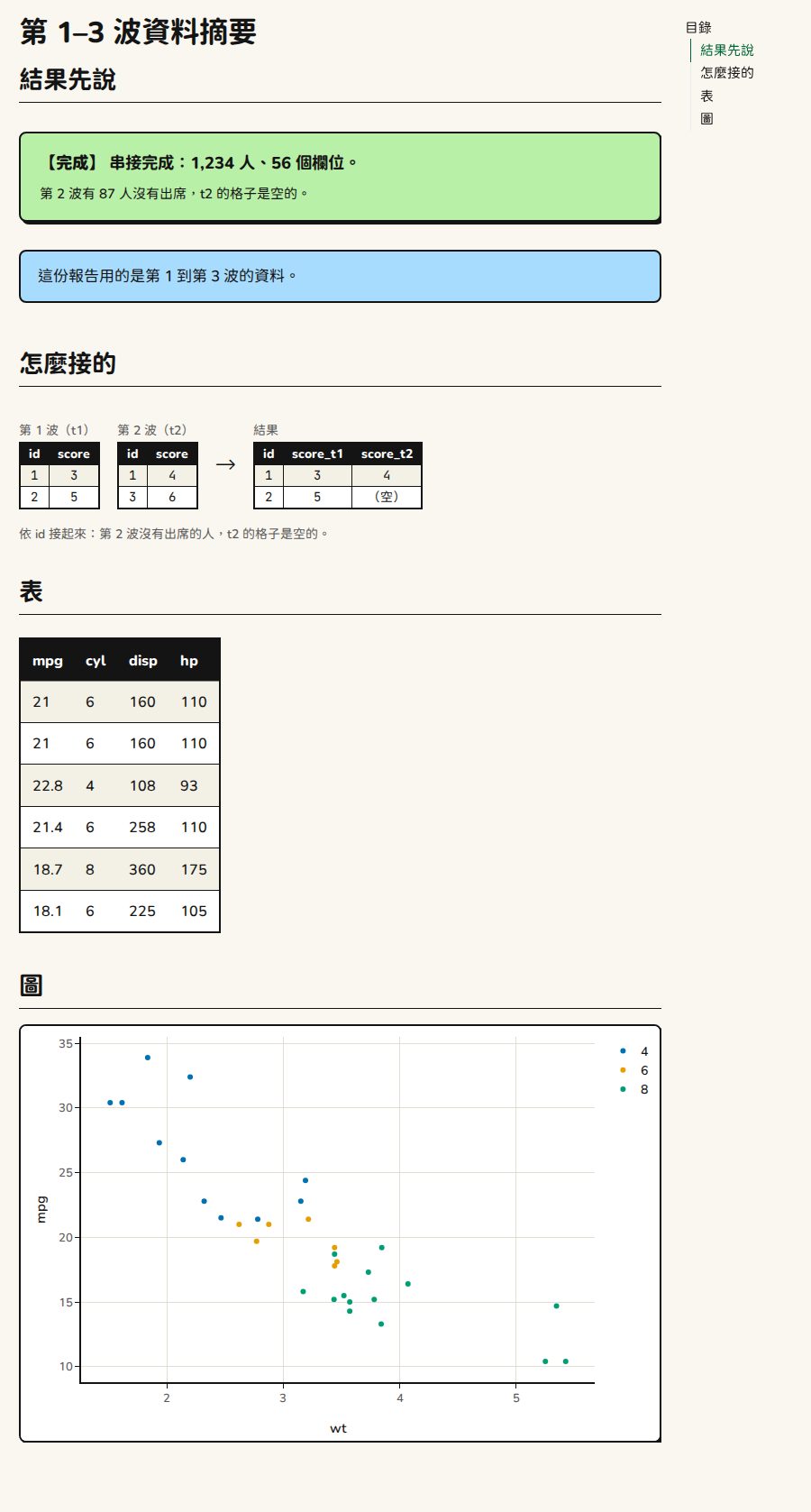
This works for HTML output only (format: html). PDF and
Word don’t get these styles.
1. Two small files
Put them next to the .qmd (in the same folder).
kit.scss: the KIT colors and fonts, the same as
kit_theme() and this site.
/*-- scss:defaults --*/
$primary: #006835;
$success: #006835;
$body-bg: #faf7f0;
$body-color: #141414;
$border-color: #141414;
$border-width: 2px;
$link-color: #006835;
$headings-font-weight: 700;
$navbar-bg: #c6d033;
$font-family-sans-serif: "Chiron GoRound TC", sans-serif;
$font-family-monospace: "JetBrains Mono", "Chiron GoRound TC", Menlo, Consolas, monospace;

/*-- scss:rules --*/
html { font-size: 17px; }
body { line-height: 1.65; }
pre.sourceCode, div.sourceCode { background: #fffdf5; border: 2px solid #141414; border-radius: 8px; }fonts.html: lets the browser load the rounded typeface
and JetBrains Mono from Google Fonts.
<link rel="preconnect" href="https://fonts.googleapis.com" data-external="1">
<link rel="preconnect" href="https://fonts.gstatic.com" crossorigin data-external="1">
<link rel="stylesheet" href="https://fonts.googleapis.com/css2?family=Chiron+GoRound+TC:wght@400;700;900&family=JetBrains+Mono:wght@400;700&display=swap" data-external="1">
Keep data-external="1". When you make a single HTML file
(embed-resources: true), it keeps the fonts out of the
file. The rounded typeface is split into hundreds of pieces; embedding
them all makes the file over 100 MB. With it, the file is about 1 MB.
The trade-off: opening the file needs an internet connection, otherwise
the system fonts are used.
2. YAML header
---
title: "第 1–3 波資料摘要"   # "Summary of waves 1–3"
lang: zh-TW
format:
  html:
    theme: [brite, kit.scss]
    include-in-header: fonts.html
    toc: true
    embed-resources: true   # to send it to someone: one single HTML file
execute:
  echo: false      # a report shows results, not code
  message: false
  warning: false
----
theme: [brite, kit.scss]: Bootswatch Brite plus the KIT colors, the same base as the apps’kit_theme(). -
lang: zh-TW: so the table of contents is titled “目錄” (for an English document uselang: en).
3. The first code chunk
```{r}
#| include: false
library(kitDesign)
# Print the value objects (status box, checklist, code) as HTML (otherwise they print as R lists)
for (cls in c("kit_status", "kit_check", "kit_checklist", "kit_code")) {
  registerS3method("knit_print", cls,
                   function(x, ...) knitr::knit_print(htmltools::as.tags(x), ...),
                   envir = asNamespace("knitr"))
}
```

```{r}
use_kit()  # styles and scripts for the KIT components
```
use_kit() goes in once. After that, each component is
the last line of a code chunk.
4. Add components
## 結果先說

```{r}
kit_done_status("串接完成:1,234 人、56 個欄位。",            # "Join done: 1,234 people, 56 columns."
                notes = "第 2 波有 87 人沒有出席,t2 的格子是空的。")  # "87 people missed wave 2; their t2 cells are empty."
kit_callout("這份報告用的是第 1 到第 3 波的資料。")       # "This report uses waves 1 to 3."
```

## 怎麼接的

```{r}
kit_diagram(
  before = list(
    kit_dg_table(data.frame(id = 1:2, score = c(3, 5)), "第 1 波(t1)"),     # "Wave 1 (t1)"
    kit_dg_table(data.frame(id = c(1, 3), score = c(4, 6)), "第 2 波(t2)")  # "Wave 2 (t2)"
  ),
  after = kit_dg_table(data.frame(id = 1:2, score_t1 = c(3, 5), score_t2 = c("4", "(空)")), "結果"),
  caption = "依 id 接起來:第 2 波沒有出席的人,t2 的格子是空的。"
)
```

## 表與圖

```{r}
kit_static_table(head(mtcars[, 1:4]))
```

```{r}
library(plotly)
p <- plot_ly(mtcars, x = ~wt, y = ~mpg, color = ~factor(cyl),
             colors = unname(kit_chart_colors())[1:3],   # three categories, three colors
             type = "scatter", mode = "markers")
kit_plotly_style(p, fonts = FALSE)  # the fonts are already loaded by fonts.html
```
Components you can use
A document has no Shiny server, so only the components you look at work:
| Use | Functions |
|---|---|
| Header |
kit_header(title, subtitle, logo = "inline") (the logo
is written into the page) |
| Page guide |
kit_tab_guide(), kit_steps() (the “看步驟”
(“See steps”) toggle works too) |
| Status box |
kit_status(), kit_done_status(),
kit_error_status(), kit_stale_status()
|
| Callout | kit_callout() |
| Checklist |
kit_checklist(), kit_check()
|
| How to do it in R |
kit_code() (the “複製” (“Copy”) button works too) |
| Diagram |
kit_diagram(), kit_dg_table()
|
| Data table |
kit_static_table(), kit_num()
|
| Chart |
kit_plotly_style(p, fonts = FALSE),
kit_chart_colors(),
kit_chart_sequential()
|
Not usable: modules (*_ui() / *_server()),
download buttons, notifications, the ready line, and other functions
that need a session. kit_button() draws a
button, but clicking it does nothing.
Watch out for
-
kit_plotly_style()needsfonts = FALSE. By default it attaches a dependency that points at Google Fonts. Quarto can’t handle it and stops with “Dependency kit-plotly-fonts … is not disk-based”. The fonts are already loaded byfonts.html. -
Use
unname()onkit_chart_colors(), and give exactly as many colors as there are categories. With names, plotly matches the names (blue, orange…) to the categories; nothing matches and the points disappear. With more colors than categories, plotly interpolates between them and you get gray. -
Register
knit_printfor the value objects first (the loop in section 3). Without it, status boxes, checklists and code print as R lists. - Turn off package startup messages (“Attaching package” and so on)
with
execute: message: false, or they show up in the report.