Every component on this page is rendered directly by kitDesign: each
section shows the R code first, and right below it what it looks like.
The specs (when to use it, what not to do) are in the design language; to see every component
on your own computer: kitDesign::kit_gallery().
Things that only respond inside Shiny, like buttons and collapsibles, are shown here for their look only. Stateful components (modules) come last, as screenshots.
Header
One per app, at the very top: logo, tool name, subtitle, version
line. kit_page() already includes it.
kit_header(
  "KIT 資料串接工具", "臺灣幼兒發展調查資料庫", tagline = "跨波次資料處理",   # "KIT Data Join Tool", "Kids in Taiwan", "Cross-wave data processing"
  version = "0.5.0", date = "2026-10-31",
  logo = "inline"   # in Shiny use the default TRUE; this is a static web page, so the logo is written into the page
)
KIT 資料串接工具
臺灣幼兒發展調查資料庫 · 跨波次資料處理
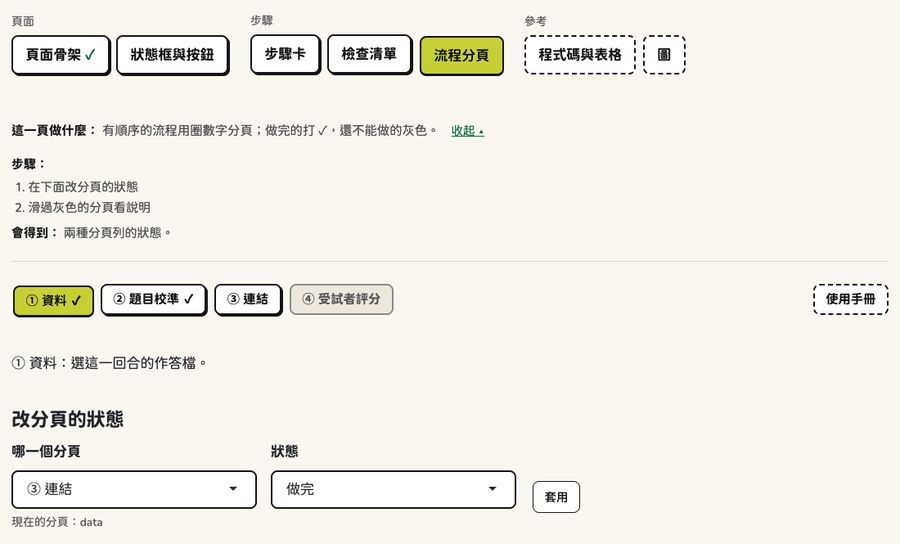
Step tabs (NavTabs)
A grouped, unnumbered tab bar (as in kitJoin). The current tab is lime; the dashed box is the “tools” group.
kit_navgroups(list(
  kit_navgroup("準備", c(upload = "檔案上傳", missing = "遺漏值處理")),        # "Prepare": "Upload files", "Missing values"
  kit_navgroup("做出資料", c(join = "串接", kits = "轉成 kits 作答檔")),      # "Build data": "Join", "Convert to kits response file"
  kit_navgroup("其他工具", c(manual = "使用手冊"), tools = TRUE)               # "Other tools": "User manual"
), tabset = "tabs", selected = "join")Scope bar (ScopeBar)
One choice shared by the whole app (for example which item bank),
right under the tab bar: radio buttons, a hint line, small buttons on
the right; a choice that needs confirming opens the confirmation area
below (panel).
kit_scope_bar(
  radioButtons("bank", "題庫", c("TDCYP 題庫(建議)" = "tdcyp", "上傳自己的題庫" = "own"),  # "Item bank": "TDCYP (recommended)", "Upload your own"
               inline = TRUE),
  line = tags$span("目前:", tags$strong("TDCYP 題庫"), " · 37 題 · 4 個波次"),  # "In use: TDCYP item bank · 37 items · 4 waves"
  actions = list(kit_button("bank_dl", "下載題庫"), kit_button("bank_new", "新增題庫"))  # "Download", "New item bank"
)Page guide: what this page does (PageGuide)
One sentence at the top of each page, with “看步驟 ▸” (“See steps ▸”) next to it; the steps and what you get are collapsed by default.
kit_tab_guide(
  goal = "把兩個波次的檔案依 ID 接成一張寬資料。",   # "Join files from two waves by ID into one wide table."
  steps = c("選 ID 欄", "選要保留哪些人", "按「執行串接」", "看狀態框與結果"),
  # "Pick the ID column", "Choose who to keep", "Click 'Run join'", "Check the status box and results"
  output = "一張寬資料:一人一列。"                   # "One wide table: one row per person."
)
這一頁做什麼: 把兩個波次的檔案依 ID 接成一張寬資料。
- 選 ID 欄
- 選要保留哪些人
- 按「執行串接」
- 看狀態框與結果
會得到: 一張寬資料:一人一列。
Button
Only one primary button per page (lime). Secondary buttons are for downloads and select-all; the danger button is salmon. A disabled button is gray, and always has “還差:…” (“Still needed: …”) above it.
tags$div(
  style = "display: flex; flex-wrap: wrap; align-items: center; gap: 0.6rem 1rem;",
  kit_button("run", "開始校準", "primary"),           # "Start calibration"
  kit_button("csv", "下載 CSV"),                      # "Download CSV"
  kit_button("skip", "這一回合不做", "danger"),        # "Skip this run"
  kit_button("convert", "執行轉換", "primary", disabled = TRUE)   # "Run conversion"
)Download button (DownloadButton)
Looks the same as a secondary button; Chinese file names save
correctly in every browser (the last part of the URL, the file name
header, and the download attribute all use the same name).
Put it inside renderUI() in the server; the file is written
only when the user clicks download. Here it is drawn with a test
session, so clicking it does nothing.
session <- shiny::MockShinySession$new()
tags$div(
  class = "kit-downloads",
  kit_download_button(session, "dl_csv", "下載 CSV", "第一波 資料.csv",   # "Download CSV", "Wave 1 data.csv"
                      function(file) utils::write.csv(mtcars, file),
                      class = kit_btn_class("secondary")),
  kit_download_button(session, "dl_gz", "下載作答檔(.csv.gz)", "kits_long.csv.gz",   # "Download response file (.csv.gz)"
                      function(file) writeLines("x", file), class = "btn-primary")
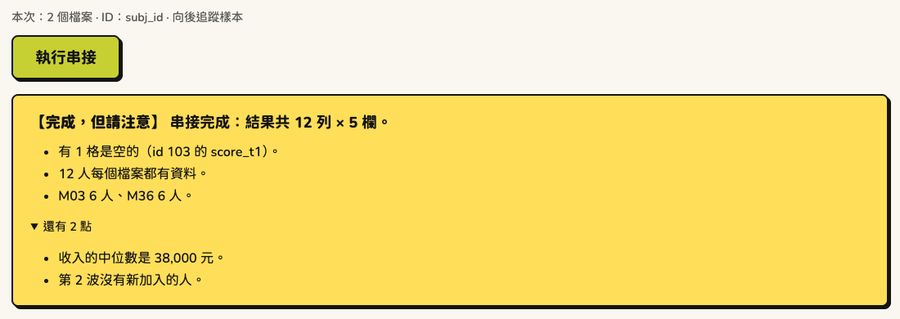
)Status box (StatusBox)
The first thing to look at after clicking the primary button. There are only four kinds: 【完成】 (Done), 【完成,但請注意】 (Done, but take note), 【停下來】 (Stopped), 【要重新執行】 (Needs a rerun). The first line is a one-sentence conclusion, followed by at most 3 points; anything more is collapsed.
kit_done_status("串接完成:結果共 3,389 列 × 2,058 欄。",   # "Join done: 3,389 rows × 2,058 columns."
points = c("688 人每個檔案都有資料。", "第 1 波 3,389 人,第 2 波 3,102 人。"))- 688 人每個檔案都有資料。
- 第 1 波 3,389 人,第 2 波 3,102 人。
# "688 people have data in every file.", "Wave 1: 3,389 people; wave 2: 3,102 people."
kit_done_status(
  "串接完成:結果共 3,389 列 × 2,058 欄。",
  warnings = c("有 12 人的 ID 重複,只留第一筆。", "第 3 波沒有 sex 欄。")
  # "12 people have duplicate IDs; only the first record is kept.", "Wave 3 has no sex column."
)- 有 12 人的 ID 重複,只留第一筆。
- 第 3 波沒有 sex 欄。
kit_error_status(simpleError("object 'subj_id' not found"), "串接") # "Join"- 怎麼辦:確認檔案內容與設定後再試一次;一直發生的話,請把下面的「原始訊息」回報給開發者。
原始訊息
object 'subj_id' not found
kit_stale_status("執行串接") # "Run join"Callout
Info is sky blue; take-note is yellow. A callout is not a result, so it has no shadow.
kit_callout("外部連結不適用:這一回合只有一個世代,這不是錯誤。")
# "External linking does not apply: this run has only one cohort. This is not an error."
kit_callout("資料裡有疑似遺漏值代碼,建議先到「遺漏值處理」。", warn = TRUE)
# "The data contain what look like missing-value codes. Go to 'Missing values' first."Cloud version (kit_is_cloud()): a yellow banner line
under the header, and the usage notes in small gray text at the very
bottom of the page. The text belongs to the app: each section’s title
and body, and the reference links.
kit_cloud_banner("此為雲端版:上傳的資料會傳送至位於美國的 Posit 伺服器。",
                 tags$a(href = "#kit-cloud-terms", "〈雲端版使用須知〉"), "。")
# "This is the cloud version: uploaded data are sent to Posit servers in the US." "(Cloud version usage notes)"
kit_cloud_footer(
  sections = list(
    "一、資料傳輸與儲存" = c("本雲端版部署於 Posit Connect Cloud,主機位於美國。",
                             "本工具不另行保存、備份或分享您的資料。"),
    # "1. Data transfer and storage": "This cloud version runs on Posit Connect Cloud, hosted in the US.",
    #   "This tool does not separately keep, back up, or share your data."
    "二、免責聲明" = "本工具以現況提供,僅供資料處理輔助之用。"
    # "2. Disclaimer": "This tool is provided as is, only to assist with data processing."
  ),
  links = c("Posit Trust Center" = "https://trust.posit.co",
            "Posit 隱私權政策" = "https://posit.co/about/privacy-policy/")   # "Posit privacy policy"
)Data table (DataTable)
The table is as wide as its content; when it is too wide, it scrolls sideways inside its own frame. A line of small text above it gives the number of rows and columns.
waves <- data.frame(
  id = 101:105, cohort = c("M03", "M36", "M03", "M36", "M03"), wave_m = c(3, 6, 12, 3, 6),
  income = c(32000, 45500, 28750, 51200, 39900)
)
tagList(
  tags$p(class = "kit-hint", kit_rows_note(120, ncol(waves), shown_rows = 5)),
  kit_table_scroll(kit_static_table(waves))
)
共 120 列 × 4 欄,以下前 5 列。
| id | cohort | wave_m | income |
|---|---|---|---|
| 101 | M03 | 3 | 32,000 |
| 102 | M36 | 6 | 45,500 |
| 103 | M03 | 12 | 28,750 |
| 104 | M36 | 3 | 51,200 |
| 105 | M03 | 6 | 39,900 |
For tables people search, page through and click (item lists, search
results), use kit_dt() inside DT::renderDT()
(the app needs Imports: DT). Same look; selected rows are
pale lime, page buttons are small buttons, the text is Chinese. See it
in kit_gallery(), tab 「互動表與範圍」.
Chart
Pass a plotly chart to kit_plotly_style() as the last
step: font, axis lines, legend, and toolbar match the app. For
before/after comparisons and usage, see “Charts”. Categorical colors use the
colorblind-friendly Okabe–Ito palette:
swatch <- function(col, name) {
  tags$div(
    tags$div(style = paste0("width: 4rem; height: 2rem; border: 2px solid var(--nb-ink); ",
                            "border-radius: 8px; background: ", col)),
    tags$small(class = "kit-hint", name)
  )
}
cols <- kit_chart_colors()
tags$div(style = "display: flex; flex-wrap: wrap; gap: 0.6rem;",
Map(swatch, cols, names(cols)), swatch(kit_chart_neutral(), "neutral"))Details row (Details)
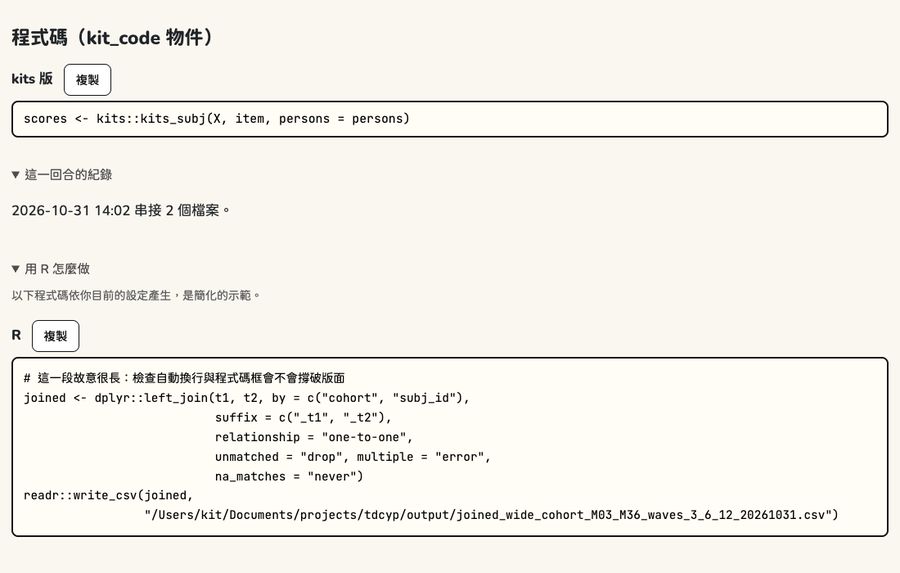
A row of collapsed details under the result: log, check table, How to do it in R. Open them when you need them.
kit_details_row(
  kit_detail("這一回合的紀錄", tags$p("2026-10-31 14:02 串接 2 個檔案。")),   # "Log for this run": "... joined 2 files."
  kit_detail("用 R 怎麼做", kit_code("joined <- dplyr::left_join(t1, t2, by = \"subj_id\")"))   # "How to do it in R"
)
這一回合的紀錄
2026-10-31 14:02 串接 2 個檔案。
用 R 怎麼做
joined <- dplyr::left_join(t1, t2, by = "subj_id")Advanced settings (collapsed by default) and the settings summary:
tagList(
  kit_advanced(checkboxInput("trim", "比對前去掉 ID 前後的空白", TRUE)),   # "Trim spaces around IDs before matching"
  kit_settings_line(c("2 個檔案", "ID:subj_id", "向後追蹤樣本"))        # "2 files", "ID: subj_id", "Follow-up sample"
)
進階設定
本次:2 個檔案 · ID:subj_id · 向後追蹤樣本
How to do it in R (CodePanel)
Code for one version: at most 70 characters per line (longer lines wrap automatically), with “複製” (“Copy”) next to it.
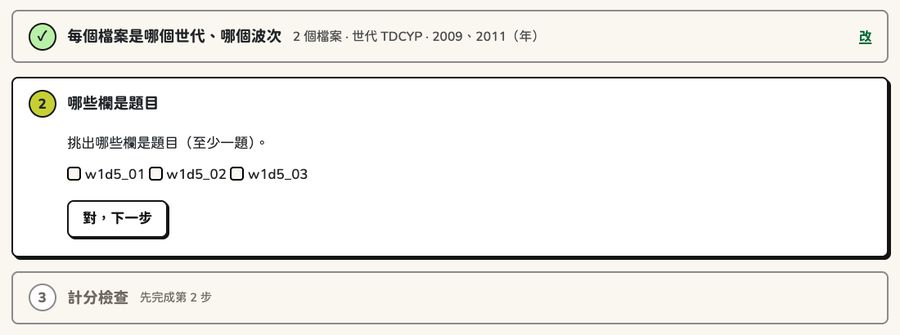
Step card (StepCard)
One step at a time: the current step has a border and shadow, done steps collapse to a one-line summary (“改” (“Edit”) goes back), and steps that can’t be done yet are gray.
tagList(
  kit_step_card(kit_step_head(1, "每個檔案是哪個世代、哪個波次", "done",   # "Which cohort and wave each file is"
                              summary = "2 個檔案 · 世代 TDCYP", edit_id = "edit1")),   # "2 files · cohort TDCYP"
  kit_step_card(
    kit_step_head(2, "哪些欄是題目", "current", title_id = "st2"),   # "Which columns are items"
    kit_step_body(tags$p("挑出哪些欄是題目(至少一題)。"), actionButton("ok2", "對,下一步")),
    # "Pick the columns that are items (at least one)." "Yes, next"
    title_id = "st2"
  ),
  kit_step_card(kit_step_head(3, "計分檢查", "locked"))   # "Scoring check"
)挑出哪些欄是題目(至少一題)。
Checklist
Things to review before converting: ! needs a decision (with buttons next to it), ✓ fine, i a reminder.
kit_checklist(
  kit_check("todo", "有 3 題的分數從 1 開始", "kits 要的分數是 0、1、2…。可以全部減 1,或照原樣。",
            actions = list(kit_button("shift", "全部減 1(建議)"), kit_button("keep", "照原樣"))),
  # "3 items have scores starting at 1", "kits needs scores 0, 1, 2…. You can subtract 1 from all, or keep them as is."
  # buttons: "Subtract 1 from all (recommended)", "Keep as is"
  kit_check("ok", "45 題的分數都是整數"),                   # "All 45 items have integer scores"
  kit_check("note", "有 2 題沒有人作答,不會放進作答檔")      # "2 items have no responses and won't go into the response file"
)-
要決定:
有 3 題的分數從 1 開始 kits 要的分數是 0、1、2…。可以全部減 1,或照原樣。
-
沒問題:
45 題的分數都是整數
-
提醒:
有 2 題沒有人作答,不會放進作答檔
Ready line: what’s still needed (ReadyLine)
When the primary button can’t be clicked yet, a line above it says what is still needed, with a link next to it that takes the user where to fix it.
tagList(
  kit_ready_line("至少要 2 個波次的檔案,目前只有 1 個",   # "Needs files from at least 2 waves; there is only 1 now"
                 actionLink("goto_upload", "到「檔案上傳」加入檔案 →")),   # "Go to 'Upload files' to add files →"
  kit_button("join", "執行串接", "primary", disabled = TRUE)   # "Run join"
)
還差:至少要 2 個波次的檔案,目前只有 1 個。 到「檔案上傳」加入檔案 →
Next step (NextStep)
When a page is done, the bottom of the page tells the user where to go next.
kit_next_step("串接好了。接著把資料轉成 kits 作答檔。", "next", "下一步:轉成作答檔")
# "Join done. Next, convert the data into a kits response file." "Next: convert to response file"Diagram
Small table before processing → small table after processing. New columns are light lime, with “(新)” (“(new)”) after the column name.
kit_diagram(
  list(kit_dg_table(data.frame(id = 1:2, score = c(3, 5)), "第 1 波(t1)"),      # "Wave 1 (t1)"
       kit_dg_table(data.frame(id = c(1, 3), score = c(4, 6)), "第 2 波(t2)")),  # "Wave 2 (t2)"
  kit_dg_table(data.frame(id = 1:2, score_t1 = c(3, 5), score_t2 = c(4, NA), wave = c(2, 1)),
               "結果", added = "wave"),   # "Result"
  "依 id 接起來:第 2 波沒有出席的人,t2 的格子是空的。"
  # "Joined by id: for people absent in wave 2, the t2 cells are empty."
)| id | score |
|---|---|
| 1 | 3 |
| 2 | 5 |
| id | score |
|---|---|
| 1 | 4 |
| 3 | 6 |
| id | score_t1 | score_t2 | wave (新) |
|---|---|---|---|
| 1 | 3 | 4 | 2 |
| 2 | 5 | (空) | 1 |
Run tab (RunTab)
Tabs with one primary button each (kitJoin’s join, stack, attrition
sample, missing values, long/wide reshaping, and format conversion) all
share one skeleton: kit_run_tab_ui() lays out the fixed
parts following the page skeleton, with the tab’s own settings in the
middle; kit_run_tab_server(), called inside the tab’s
moduleServer(), handles still needed, the settings summary,
running, the status box, notifications, scrolling to the status box,
【要重新執行】 (Needs a rerun), and the result details and “How to do it
in R”. Below is how it looks before there is a server (settings summary,
status box, and result are empty, and the primary button is
disabled).
kit_run_tab_ui(
  "stack", "執行疊加",   # "Run stack"
  guide = kit_tab_guide("把各波資料上下疊起來:每個人在每一波各佔一列。", c("按「執行疊加」", "看狀態框與預覽"), "一張長格式的資料。"),
  # "Stack each wave's data on top of each other: one row per person per wave.",
  # "Click 'Run stack'", "Check the status box and preview", "One long-format table."
  selectInput("stack-wave_col", "波次欄的名稱", c("wave", "t"))   # "Name of the wave column"
)
這一頁做什麼: 把各波資料上下疊起來:每個人在每一波各佔一列。
- 按「執行疊加」
- 看狀態框與預覽
會得到: 一張長格式的資料。
用 R 怎麼做
Server (inside the tab’s moduleServer()):
tab <- kit_run_tab_server(
  input, output, session, "執行疊加",
  ready = reactive(kit_need_files(length(files()), 2L)),       # Still needed: … (disables the primary button)
  settings = function() paste0(length(files()), " 個檔案"),     # This run: … ("N files")
  stale_on = function() list(files(), input$wave_col),         # changed → 【要重新執行】 (Needs a rerun)
  progress = "正在疊加資料…",                                   # "Stacking data…"
  run = function() dplyr::bind_rows(files(), .id = input$wave_col),
  done = function(res) kit_done_status(paste0("疊加完成:結果共 ", kit_dims(nrow(res), ncol(res)), "。")),
  details_ui = function(res) kit_detail("結果預覽", kit_preview_table(res)),   # "Result preview"
  code = function() "stacked <- dplyr::bind_rows(t1, t2, .id = \"wave\")"
)
list(state = tab$state)                                        # used by step tabs for the ✓
Modules (stateful components)
The four components below only work inside Shiny (which step is open,
whether a button can be clicked, the ✓ on tabs), so they are shown as
screenshots. Each takes one line in each place: *_ui(id)
goes in the page, *_server(id) goes in the server.
Step cards: kit_stepcards_ui() /
kit_stepcards_server()
Primary button + still needed:
kit_run_gate_ui() / kit_run_gate_server()
Step tabs: kit_step_tabs_ui() /
kit_step_tabs_server() (flow tabs: ✓ when done, gray when
not available yet)
How to do it in R: kit_code_panel_ui()
/ kit_code_panel_server() (code is computed only when
opened)