The shared interface layer for KIT research tools (kitJoin, kitsUI, and future KIT Shiny apps): one setup function puts the theme, styles, logo, and header in place, and a set of documented kit_*() components builds the page. Every component follows the KIT design language: easy to see, safe to click, results first.
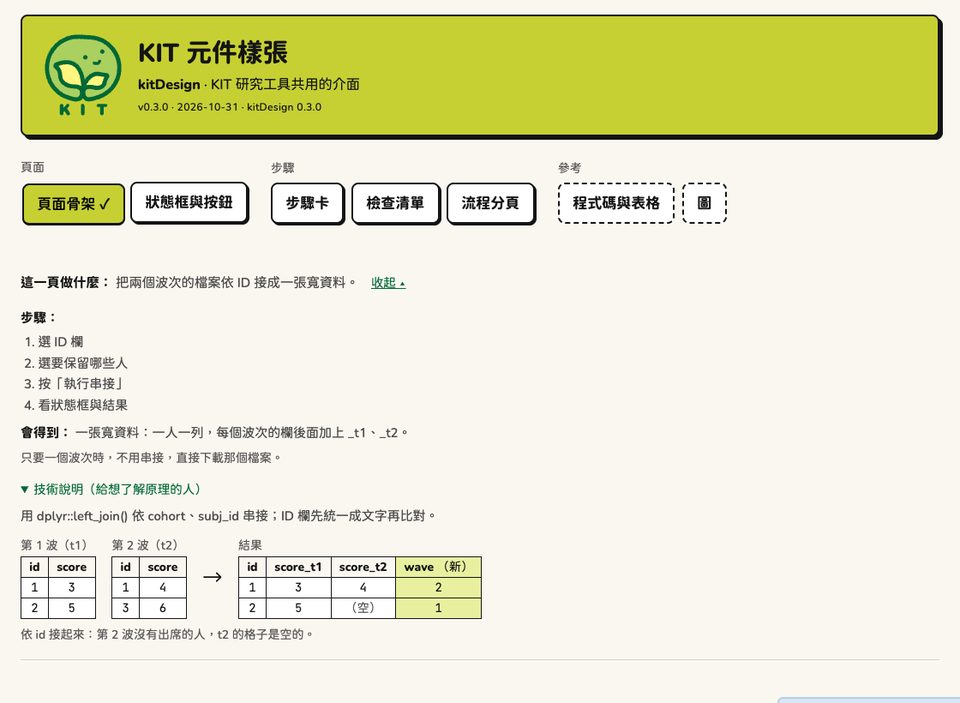
- Theme: Bootswatch Brite (bslib 0.11.0 or later) + KIT colors, the rounded typeface Chiron GoRound TC, and the monospace JetBrains Mono.
- Brand: the logo and colors are not hard-coded. The default is KIT; other projects use
kit_brand()to switch to their own logo and color palette. - Style: restrained neo-brutalism (2px black borders, hard shadows, flat color blocks with black text), 17px body text, content at most 1140px wide.
- Components: header, step tabs, page guide, buttons, download button, status box, callout, cloud-version banner and usage notes, details row, “How to do it in R”, step cards, checklist, ready line (“what’s still needed”), next step, diagram, data table, charts (plotly styling).
- Server-side helpers: disable the primary button and say what’s still needed, scroll to the status box after a run, mark tabs with ✓, notifications, thousands separators, plain-language errors.
Installation
# install.packages("remotes")
remotes::install_github("jiewenTsai/kitDesign")
Depends only on shiny, bslib (>= 0.11.0), and htmltools (plus grDevices and utils, which ship with R). kit_plotly_style() also needs plotly, and kit_dt() needs DT.
If bslib is too old (the Brite theme does not exist before 0.11.0), kit_theme() stops and tells you to install a newer version. When installing an app, use pak::pkg_install("<account>/<app>") or remotes::install_github("<account>/<app>", upgrade = "always") so outdated packages are upgraded too.
Quick start
Fastest: create a new app package skeleton (header, step tabs, one example tab laid out with the page skeleton, and tests are all included).
kitDesign::kit_new_app("~/kitScore", "KIT 計分工具", "臺灣幼兒發展調查資料庫")
# "KIT Scoring Tool", "Kids in Taiwan: National Longitudinal Study of Child Development and Care"
Writing a page yourself:
library(shiny)
library(kitDesign)

ui <- kit_page(
  "KIT ×× 工具", "臺灣幼兒發展調查資料庫",
  version = "0.1.0", date = "2026-10-31", show_kitdesign = TRUE,
  kit_tab_guide(
    goal = "把兩個波次的檔案依 ID 接成一張寬資料。",  # "Join the files from two waves by ID into one wide table."
    steps = c("選 ID 欄", "按「執行串接」", "看狀態框與結果"),  # "Pick the ID column", "Click 'Run join'", "Check the status box and results"
    output = "一張寬資料:一人一列。"  # "One wide table: one row per person."
  ),
  selectInput("id_col", "ID 欄", c("(還沒選)" = "", "subj_id")),  # "ID column", "(not chosen yet)"
  kit_run_gate_ui("gate", "執行串接"),     # "Still needed: ..." + primary button ("Run join")
  uiOutput("status"),
  kit_details_row(kit_code_panel_ui("code"))
)

server <- function(input, output, session) {
  run <- kit_run_gate_server("gate", reactive(
    if (input$id_col == "") "選 ID 欄"  # "Pick the ID column"
  ))
  status <- reactiveVal(kit_status())
  observeEvent(run(), {
    status(kit_done_status("串接完成:結果共 3,389 列。"))  # "Join complete: 3,389 rows in the result."
    kit_scroll_to("status")              # scroll to the status box after the run
  }, ignoreInit = TRUE)
  output$status <- renderUI(status())    # a kit_status object renders directly
  kit_code_panel_server("code", function() list(
    tidy = "joined <- dplyr::left_join(t1, t2, by = \"subj_id\")"
  ))
}

shinyApp(ui, server)
Step-by-step guide: vignette("kitDesign"). To see every component: kitDesign::kit_gallery(), or the component overview on the website.
Pass plotly charts (for example from kits’ plot()) to kit_plotly_style() last:
p <- plot(item, type = "category")      # plotly chart drawn by kits
p <- kit_chart_zh(kit_chart_categorical(p))   # kitsUI: recolor, switch to Chinese (must come first)
kit_plotly_style(p)                     # last: KIT fonts, axis lines, legend, toolbar
Switching to another brand
Projects other than KIT can use it too: swap the logo and colors; everything else (fonts, borders, shadows, components) follows the design language. Set it once at app startup and every function uses it:
options(kitDesign.brand = kit_brand(
  "示範實驗室",                          # "Demo Lab"
  logo = "logo.svg",                     # logo in the header (SVG or PNG)
  mark = "mark.svg",                     # small browser-tab icon (square; uses logo if not given)
  colors = list(accent = "#9cc0ff", primary = "#1f4fa3", page = "#f5f7fa")
))
Or for a single page only: kit_page(..., brand = kit_brand(...)). For the color names (ink, page, card, accent, accent_light, primary, primary_hover, success, warning, danger, info) and how they map to CSS variables (--nb-*), see ?kit_brand. Anything not given follows KIT; kit_brand() with no arguments is KIT. To see what the switch looks like: kit_gallery(brand = "demo").
Component overview
Setup
| Function | What it does |
|---|---|
kit_page() |
Whole page: bslib::page_fluid(lang = "zh-Hant-TW") + theme + styles + header |
kit_theme() |
bslib theme (Bootswatch Brite + KIT colors and fonts) |
use_kit() |
Styles and scripts (htmltools dependency; for building pages yourself) |
kit_header(), kit_app_meta()
|
Header, version line |
kit_app_description() |
Reads Version and Date from the app’s DESCRIPTION |
kit_brand(), kit_current_brand()
|
Brand: logo, tab icon, colors (default KIT; options(kitDesign.brand = )) |
kit_logo_uri(), kit_colors()
|
KIT logo (data URI), brand colors |
kit_gallery() |
Component sample app (brand = "demo": see another brand) |
kit_new_app() |
Creates a new KIT app package skeleton |
kit_versions() |
Versions of kitDesign and the app (for reporting problems) |
Modules (stateful components, one line per page)
| UI | server | What it does | server returns |
|---|---|---|---|
kit_step_tabs_ui() |
kit_step_tabs_server() |
Step tabs (flow or grouped); ✓ when done, not available yet, needs re-run |
selected(), select(), states()
|
kit_stepcards_ui() |
kit_stepcards_server() |
Step cards: which step is open, “對,下一步” (“Yes, next step”), “改” (“Edit”), summary, checks |
current(), done(), open(), reset()
|
kit_run_gate_ui() |
kit_run_gate_server() |
Primary button + “還差:…” (“Still needed: …”) | Number of clicks while it was allowed to run |
kit_code_panel_ui() |
kit_code_panel_server() |
“How to do it in R” (computed only when opened) | The current kit_code
|
Tab skeleton
| UI | server | What it does | server returns |
|---|---|---|---|
kit_run_tab_ui(id, run_label, guide, ..., gate, result, downloads, details, code, next_step) |
kit_run_tab_server(input, output, session, run_label, run, done, ready, settings, stale_on, progress, error, guard, confirm, result_ui, details_ui, code) |
A tab with one primary button, laid out with the page skeleton: still needed, settings summary, run (progress bar), status box, notification, scroll to status box, 【要重新執行】 (“Needs re-run”), key results and details, “How to do it in R” |
result, status, state, run(...)
|
Not a Shiny module: call it inside the tab’s own moduleServer(), so the settings inputs stay in the tab’s namespace.
Value objects (put directly into a page or renderUI())
| Function | class | What it does |
|---|---|---|
kit_status(), kit_done_status(), kit_error_status(), kit_stale_status()
|
kit_status |
Status box: 【完成】 (“Done”), 【完成,但請注意】 (“Done, but note”), 【停下來】 (“Stopped”), 【要重新執行】 (“Needs re-run”) |
kit_check(), kit_checklist()
|
kit_check, kit_checklist
|
Checklist (! needs a decision, ✓ OK, i reminder) |
kit_code() |
kit_code |
One version of the code (at most 70 columns per line, with a “複製” (“Copy”) button) |
Contents are checked at construction (for example, the state can only be idle/success/warning/error/stale); all have htmltools::as.tags(), format(), and print().
Navigation (low level)
| Function | What it does |
|---|---|
kit_navgroups(), kit_navgroup()
|
Grouped, unnumbered tab bar (use with tabsetPanel(type = "hidden")) |
kit_flow_tabs() |
Ordered flow tabs (① ② ③); tabs that are not a flow step go on the far right |
kit_tab_states() |
Computes tab ✓, gray, and needs re-run from status box states |
kit_watch_tab_states(), kit_send_tab_states()
|
Sends tab states to the browser |
Page components
| Function | What it does |
|---|---|
kit_tab_guide(), kit_steps()
|
What this page does (collapsed by default, “看步驟 ▸” (“See steps ▸”)) |
kit_diagram(), kit_dg_table()
|
Diagram: small table before processing → small table after |
kit_button(), kit_btn_class()
|
Primary, secondary, and danger buttons |
kit_callout() |
Callout (info/caution) |
kit_cloud_banner(), kit_cloud_footer(), kit_is_cloud()
|
Cloud version: reminder banner below the header, usage notes in the footer, whether this is the cloud version |
kit_download_button() |
Download button: Chinese file names save correctly in every browser (test with kit_test_download()) |
kit_advanced() |
Advanced settings (collapsed) |
kit_settings_line() |
Settings summary (“本次:…” (“This run: …”)) |
kit_ready_line() |
Still needed: … |
kit_next_step(), kit_app_link()
|
Next step, link to another app |
kit_step_card(), kit_step_head(), kit_step_body()
|
Step card (current, done, not available yet) |
kit_problems() |
A single problem inside a step card (“還差:…” (“Still needed: …”)) |
kit_scope_bar() |
Scope bar: an app-wide choice (for example which item bank) right under the tab bar: radio buttons, a hint line, small buttons, an area to confirm |
Results
| Function | What it does |
|---|---|
kit_status_ui() |
Low-level status box rendering (at most 3 points, the rest as “還有 N 點” (“N more”); what to do; raw message) |
kit_details_row(), kit_detail()
|
A row of collapsed details below the results |
kit_code_panel(), kit_code_blocks(), kit_render_code_panel()
|
Low-level functions for “How to do it in R” |
kit_code_wrap(), kit_code_cols()
|
Wraps code to at most 70 columns per line; columns per line (a Chinese character counts as 2) |
kit_static_table(), kit_preview_table(), kit_table_scroll()
|
Data table, preview table, horizontally scrolling box |
kit_dt() |
Interactive table (DT) with the same look, for tables people search, page through and click; selected rows are light lime, text in Chinese (DT is in Suggests) |
kit_rows_note(), kit_dims(), kit_num()
|
“共 3,418 列 × 25 欄,以下前 10 列。” (“3,418 rows × 25 columns; first 10 rows below.”), thousands separators |
kit_chart_colors(), kit_chart_neutral()
|
Chart categorical colors (Okabe–Ito) and neutral colors |
kit_chart_sequential() |
Color scale for continuous values (very light lime → light lime → KIT green; 0% stays distinct from blank no-data cells), for heatmaps |
kit_plotly_style() |
Applies the KIT look to plotly charts: fonts, axis lines, gridlines, white background, left-aligned bold title, legend, color scale, hover boxes, a trimmed toolbar (plotly is in Suggests) |
kit_plotly_fonts() |
Attaches the app’s fonts to plotly charts (for downloaded single-file HTML; kit_plotly_style() attaches them by default) |
Server side
| Function | What it does |
|---|---|
kit_run_gate(), kit_need_files()
|
Disables the primary button while it can’t be clicked yet and writes what’s still needed above it (low-level version of the module) |
kit_scroll_to() |
Scrolls the status box to the top of the screen after a run |
kit_open_details() |
Opens a collapsible section |
kit_unload_guard() |
When there are results, asks once before leaving the page |
kit_notify() |
Notifications (stopped: red for 10 seconds; others 6 seconds) |
kit_abort(), kit_is_user_error()
|
Plain-language errors shown to users |
Design language
brand/en/design-language.md is the spec for every component (purpose, look, rules, don’ts); brand/_brand.yml holds the design variables such as colors and fonts; brand/logo/ holds the logo files.
Versions and maintenance
- Semantic versioning: patch = fixes, screens and functions unchanged; minor = new components or options; major = renames, removals, visible design changes. Release steps and checklist:
brand/en/release.md; changes in each version:NEWS.md. - To pin an app to a version:
Remotes: jiewenTsai/kitDesign@vX.Y.Z,Imports: kitDesign (>= X.Y.Z). - The header can show both versions:
kit_page(..., package = "kitJoin", show_kitdesign = TRUE)→ “kitJoin v0.6.0 · 2026-10-31 · kitDesign 0.5.0”. - Name mapping for moving kitJoin and kitsUI to kitDesign:
brand/en/migration.md.
Development
- R code must be ASCII only (an
R CMD checkrule). Write strings in Chinese directly; after editing, runLC_ALL=en_US.UTF-8 Rscript tools/escape_non_ascii.Rfrom the package root: Chinese is replaced with\uXXXX, with a “# 原文:…” (“# Original: …”) comment added above. - Styles live in
inst/www/:kit-base.css→kit-brite.css→kit-design.css(the order must not change); scripts are ininst/www/kit.js. - Checks:
LC_ALL=en_US.UTF-8 R CMD build . && LC_ALL=en_US.UTF-8 R CMD check --no-manual kitDesign_0.4.0.tar.gz; screens:LC_ALL=en_US.UTF-8 Rscript tools/check_gallery.R(screenshots at 1280 and 390 width; the page must not scroll horizontally; danger buttons are salmon); demo brand:Rscript tools/check_gallery.R <folder> 7551 demo. - GitHub Actions:
.github/workflows/R-CMD-check.yaml(push and pull request);.github/workflows/pkgdown.yaml(website, deployed to thegh-pagesbranch). - Website:
pkgdown::build_site()builds intodocs/(not tracked in git); configuration is in_pkgdown.ymlandpkgdown/extra.css, and site-only articles are invignettes/articles/(not packaged as vignettes).